Thinking it through
The second reader
A second reader reads your idea the way someone else would, before anyone else does, and leaves the questions they’d ask in the margin, beside the words that made them wonder. It never writes on your page.
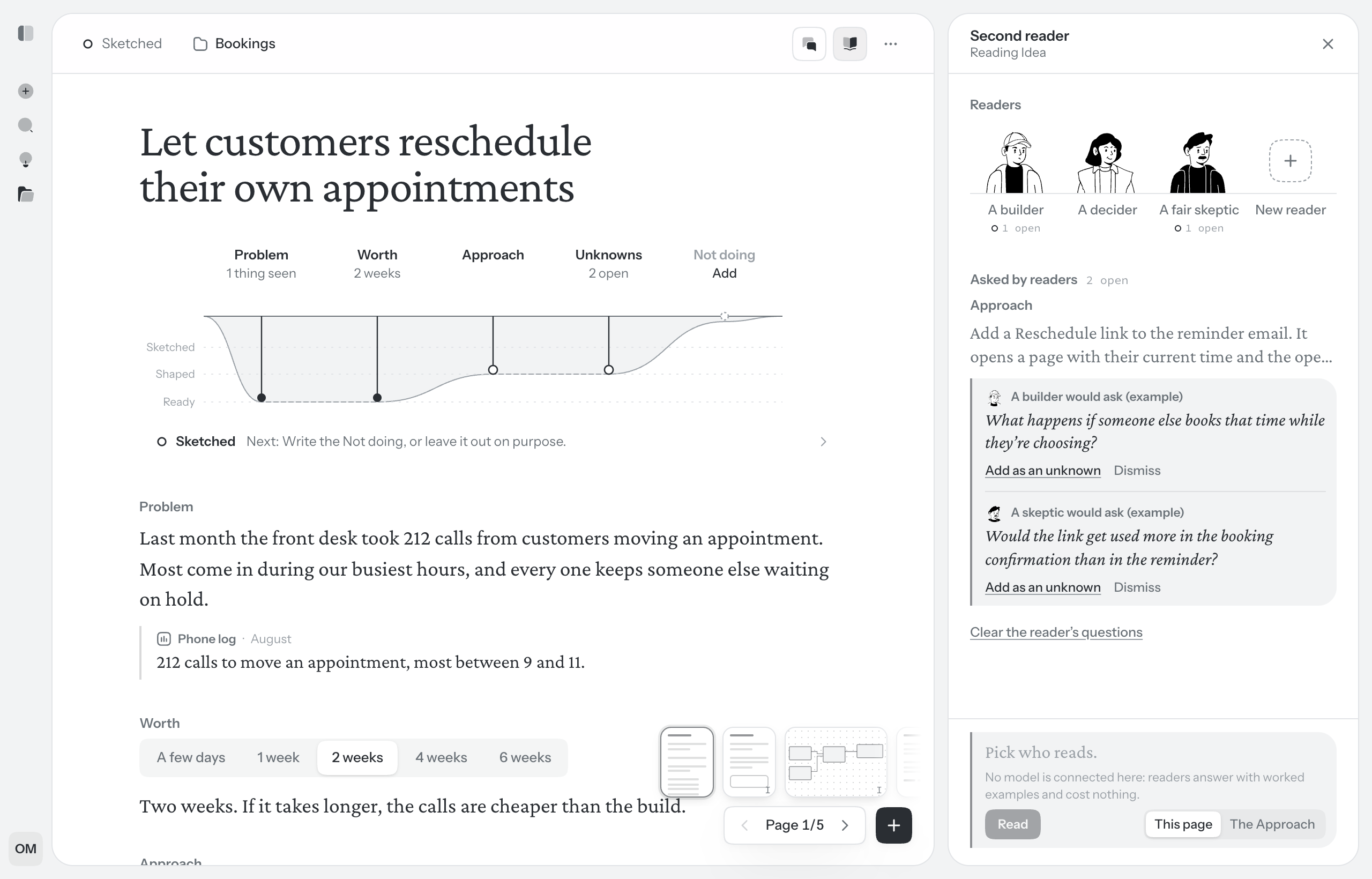
The three readers
Three readers come with Walden. Each reads like someone who will have to live with the idea:
- A builder
- Who has to make every decision the idea leaves open
- A decider
- Weighing this against everything else
- A fair skeptic
- Is the problem smaller, or the answer bigger, than it looks?
Beside them stand any readers you write yourself; see below. Each reads the page with the idea’s other written pages beside it, so it doesn’t ask what another page already answers. When the project lets readers read the code, the builder also reads how the product is built today. See Repositories.
Ask for a read
- Choose Second reader in the idea’s toolbar. It opens beside the page, in the space chat uses, so one of the two is open at a time. The first time, a few short steps introduce the readers.
- Under Readers, pick one reader or several, up to 4 at a time.
- The box at the bottom says who will read what. If your cursor is in a part with words in it, choose This page or only that part.
- Choose Read. Each reader reads on its own.
What comes back
The questions land in the margin, beside the part each is about. A read asks a few questions at most, often fewer, and when the page holds up the panel says so and adds nothing. Before they land, Walden drops any the page already answers and any asked before, and says how many it dropped.
Each reader remembers what it asked on this idea and what became of each question, so nothing is asked twice. A reader holds at most 8 open questions on a page; with that many, it sits the next read out until you answer or dismiss some.
Readers read written pages. On a board or a UI sketch, the panel lists the readers’ questions still open elsewhere in the idea.
Answer a question
A block with questions shows the askers’ faces in the margin. Choose them to open the questions; each says who asks, such as A builder would ask. In the panel, Asked by readers lists the page’s open questions under the part each belongs to. There are no replies and no threads. A question gets one of two answers:
- Add as an unknown. It becomes an open unknown, written as yours: on the idea’s first page it joins Unknowns; on any other page it goes beside the block it was about. Then settle it, leave it to the builder or rule it out like any other. See Unknowns and Not doing.
- Dismiss. It goes. The reader remembers, and won’t ask it again.
When what you write may answer a question, a line under it says so. It answers nothing for you. Clear the reader’s questions, at the bottom of the panel’s list, dismisses every reader’s open question on the page at once. Questions in the margin aren’t shown when you present.
Readers of your own
The three built-in readers think like a software team. Write a reader for whoever else should see an idea before it goes: your support lead, a careful finance team, whoever gets the call when it breaks.
- At the end of the line of readers, choose New reader.
- Give them a Name, such as “Our support lead”.
- Under Who they are, and what they look for, say it in a sentence or two. All a reader knows of who they are is what you write here, so say what they care about and what they notice first: “Runs month-end close. Wants to know what this does to invoices, refunds and anything already billed.”
- Choose Save. They join the line with a face of their own, and you pick them like any reader.
- You can write up to 12 readers. They are yours: in your panel on every idea, in every workspace you’re in, and in nobody else’s. The questions they ask sit in the margin, where everyone in the idea can see them.
- They read the same pages and ask the same way as the built-in three. Only the builder reads the code.
- Point at a reader you wrote and choose Edit to change them, or Remove to take them out of the line, with Undo straight after. Questions they already asked stay where they are. The built-in readers can’t be changed or removed.