Writing an idea
Readiness
Walden reads each part of an idea as you write and shows how far it has got: Sketched, Shaped or Ready. It’s there to show you the next step. It never stops you, and nobody sets it by hand.
The four depths
- Not started
- Nothing is written in the part yet.
- Sketched
- Something is written, but it doesn’t do its job yet.
- Shaped
- It does its job.
- Ready
- Whoever picks it up could work from it without coming back to you.
The whole idea is as deep as its shallowest part. A part you haven’t added yet holds it at Sketched. A part you left out on purpose doesn’t count, and neither does Worth until you add it.
What moves a part along
Each part moves along when it answers one question. To be Shaped, a part has to do its job. To be Ready, it has to answer what a builder would otherwise come back to you for:
- Problem. Shaped when it says who has the problem and what goes wrong for them. Ready when something seen, said or counted sits under it.
- Worth. Shaped once a size is set. Ready when it says why this much, and not more.
- Approach. Shaped when it names the main parts and how they fit together. Ready when every decision a builder would come back to you for is made, or plainly left to them.
- Unknowns. Shaped when it names a question whose answer would change the approach. Ready once each one is settled, left to the builder or ruled out.
- Not doing. Shaped once it names something. Ready when each line says why it’s out.
Some answers are plain from the page, such as whether a size is set or every unknown is closed. The rest Walden reads from what you wrote, shortly after you stop typing. A question a colleague leaves in the margin of a part holds it back from Ready until it’s added to the page or dismissed; a second reader’s questions don’t. See Unknowns and Not doing.
Do the parts agree?
One more question is asked of the whole idea: Do the parts agree with each other? No single part can see a contradiction, such as an Approach that builds something Not doing rules out, or that ignores an unknown you settled. While two parts disagree, the idea can’t be Ready, and its next step says so.
The strip and the next step
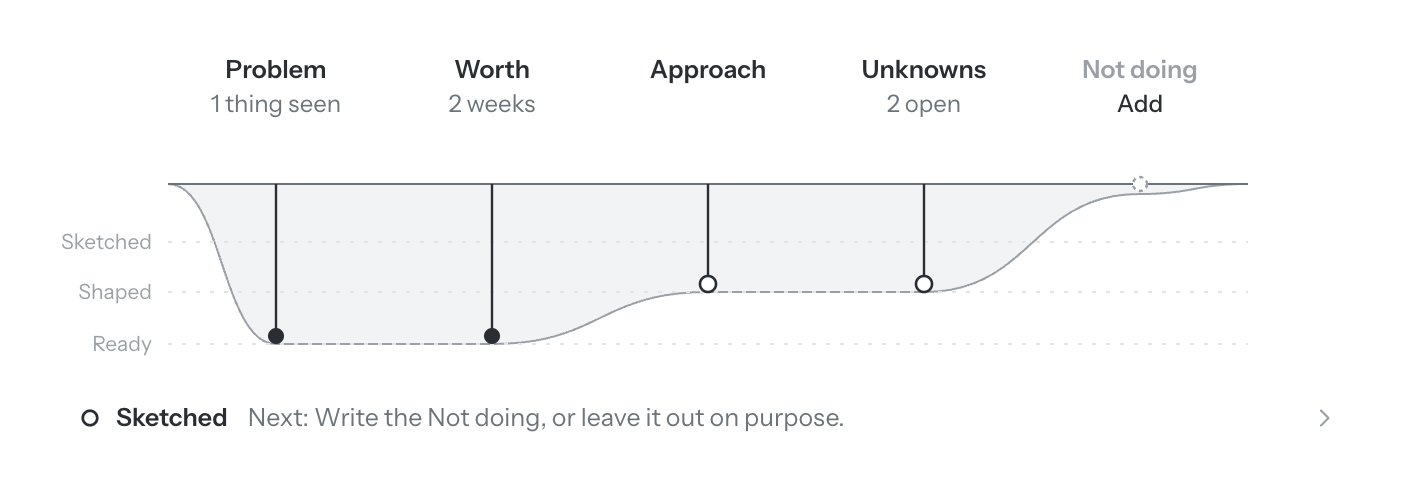
Under the title of the idea page is a line for each part, hanging deeper as the part goes deeper. Under each part’s name a few words say what’s there: how many things seen under the Problem, the size of the Worth, how many unknowns are open. A part that isn’t on the page says Add; one you left out on purpose says Not needed; a list you said is empty on purpose says Nothing, on purpose. Click a part’s name to go to it.
Under the strip, one line says where the whole idea stands and the one thing to do next. Click it to open it: every part’s two questions are listed, each marked yes or not yet, and Together says whether the parts agree.
Where it shows
- On the idea page: the strip and the next step.
- In the idea’s toolbar: a dot and the depth, until the idea is handed off or shelved. The dot fills once it’s Ready.
- In your list of ideas, on the Forming tab: the How deep column, and the next step under each title. See Finding your way around.
- In the sidebar: filter Recents to Sketched, Shaped or Ready.
It informs, it never blocks
You can present an idea, or hand it off, at any depth. When you hand it off, Walden lists what’s still open so you see it first. Readiness stays with you: it isn’t in the package your team gets, and Walden never uses it to rank one idea against another. See Handing off.