Building it
Following a build
Once an idea is handed to a coding agent, you follow the build from the idea: the agent’s tasks, the questions it asks, and what it says when it’s done. Walden runs nothing. It keeps the list, and a person reviews what was built.
How the build stands
The idea’s toolbar says where the build is:
- Not picked up yet
- Handed off, and no agent has taken it yet.
- Picked up
- Someone’s agent has chosen it and hasn’t made its list of tasks yet.
- Building · 3 of 8
- The agent is working through its list. The count is how many tasks are done.
- To review
- The agent says it’s done. It waits for a person to look.
- Built
- Someone looked at it and marked it built.
While a question from the build waits for an answer, the count sits beside it, as in 1 question. Click it to open the build beside the idea, where chat and the second reader open. If the build moves on while you’re in the idea, Walden says so once in a short message, such as Finished. Yours to review., with See it to open it.
In the idea book, the idea is listed under Handed off while it’s built, with the agent’s line on what it’s doing. Once it’s built it moves to Built, saying As planned or Went differently, with its pull request. Above the tabs, Waiting on you lists any unanswered question and any finished build nobody has marked yet. See Finding your way around.
The build panel
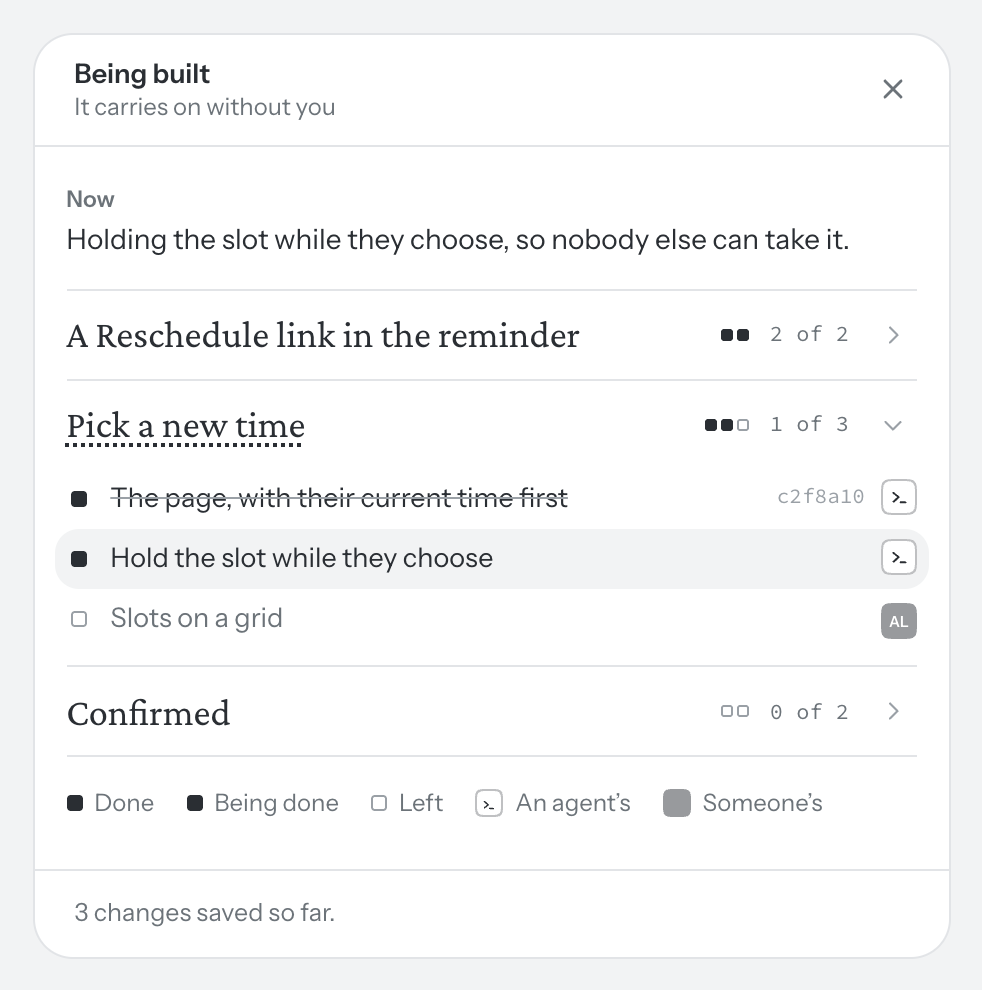
Before the agent has made its list, the panel says so: “Its list appears here once the agent has read the idea and broken it into tasks.” Then it shows:
- Now. The agent’s own line on what it’s doing.
- The pieces of work. Each is named after the part of the idea it builds, with a square for each task and a count such as 3 of 8. Open a piece to see its tasks.
- Each task. A filled square is Done, a breathing one Being done, a hollow one Left. Beside it is whose it is: the agent’s mark, or a person’s face. A finished task shows the commit that did it.
- At the foot, how many changes the agent has saved, and its pull request once it has one.
The words a piece builds
Choose a piece or a task and Walden marks the words of the idea it builds, on the Idea page, with a faint dotted underline. Nothing is written into the page, and the mark goes when you choose something else or close the panel.
Take a task
Sometimes a task is better done by a person. Click the mark beside it and choose Take it. It’s yours from then on: click its square to move it from Left to Being done to Done. The agent sees whose it is and leaves it alone. Nobody can give a task to someone else.
Questions from the agent
When the idea doesn’t answer something and the answer changes what gets built, the agent asks. The question sits in the margin beside the part it’s about, marked Asked while building, with what the agent found and how many tasks wait on it. It holds only those tasks; the agent carries on with the rest. The question also appears at the top of the panel under Waiting on you, and Answer it on the page takes you to it.
Someone who can edit the idea answers it on the page, in one of three ways. Each puts a line on the page:
- Settle it. Write what you decided, then Settle. It goes under Unknowns, settled.
- Leave it to the builder. It goes under Unknowns as left to the builder. The agent chooses, and says what it chose when it’s done.
- Rule it out. Write what you’re not doing. It goes under Not doing.
Often the agent asks one of the idea’s own unknowns, in the same words. Then the margin and the Unknowns list are one question: settle the unknown in the list with a note, leave it to the builder or rule it out, and the agent’s question closes with it; answer in the margin, and the unknown on the page is settled with your words. Nothing is written twice.
The agent reads your answer the next time it looks, and the tasks it held carry on. What you decide is also kept for later ideas. See Decisions from earlier ideas.
The agent asks whoever runs it too. If they answer there, their words are kept beside the question, as in Sam said “…”, and the agent goes on from them. The page doesn’t change until a person puts the answer there: Put it on the page as it is, or Change it first.
Picked up, and taken over
The first agent to choose the idea or make its list picks it up, and the panel says whose it is: By Sam’s agent. One person’s agent builds an idea at a time. If someone else takes it over, their agent carries on from the same list. See Coding agents.
Review it
When the agent says it’s done, the panel shows It’s done., with View it on the preview if it gave a preview and What went differently from the plan if anything did. Look at what was built, then choose:
- Mark it built. The idea moves to Built in the idea book, with Undo if you change your mind.
- Not yet. Say what is left, choose the piece it goes Under, then Send it back. It becomes a task, marked as added in review, and the agent finds it the next time it asks what’s left.
The panel also keeps The call you made: what the idea said when you handed it off, dated that day. The idea may change afterwards; that record doesn’t. To keep working on the idea instead, reopen it. See Handing off.
Emails
Walden emails about a build at five moments and no others. Each goes once for a build, never about something you did yourself, and never with words the agent wrote.
- When the work is picked up. If you handed it off.
- When a build asks a question. If you handed it off and someone else runs the agent.
- When it is finished. If you can edit the idea.
- When a review sends it back. If your key picked it up.
- When it is marked built. Everyone on the idea.
Turn any of them off in Settings → Emails. Nothing is sent for a single task.